Guides · October 6, 2026
AI voice agent ROI: how to calculate it with your own numbers
ROI for an AI voice agent comes down to cost per booked meeting versus what a meeting is worth. Here is the maths, a worked illustrative example and where people fool themselves.

AI voice agent ROI is the value of the outcomes the agent produces, minus what it costs to run, set against what you would have gotten otherwise. The simplest honest version is cost per booked meeting compared with what a meeting is worth to you. Below is the method, a worked example with illustrative numbers, and the places people usually flatter their own results.
None of the numbers in this guide are benchmarks. They show the shape of the calculation. Replace them with your own.
The core formula
Start with four inputs.
| Input | Where it comes from |
|---|---|
| Leads called per month | Your lead volume |
| Contact rate | Share of leads who pick up and talk |
| Booking rate | Share of conversations that end in a booked meeting |
| Cost per month | Platform + providers + time |
Then compute:
- Conversations = leads called x contact rate
- Booked meetings = conversations x booking rate
- Cost per booked meeting = monthly cost / booked meetings
- Value per booked meeting = show rate x close rate x average deal value
- Net monthly return = (booked meetings x value per meeting) - monthly cost
The calculation is the same one in the AI calling ROI calculator and the cost per booked meeting calculator resources, which give you worksheets.
A worked example (illustrative)
A home-services business gets 600 new leads a month from ads and referrals.
Inputs
- Leads called: 600
- Contact rate: 40%, so 240 conversations
- Booking rate: 25% of conversations, so 60 booked appointments
- Show rate: 70%, so 42 attended
- Close rate on attended: 30%, so about 12.6 jobs
- Average job value: $1,800
Monthly cost (illustrative)
| Item | Cost |
|---|---|
| Platform plan | $299 |
| Phone number and carrier costs | $40 |
| AI usage billed by providers | $120 |
| Review time: 4 hours at $40 | $160 |
| Total | $619 |
Results
- Cost per booked appointment: $619 / 60 = about $10.32
- Cost per attended appointment: $619 / 42 = about $14.74
- Revenue from 12.6 jobs: about $22,680
- Return on cost: roughly 36 times, before the cost of doing the work and materials
That number looks absurdly high, and it should make you suspicious. It ignores gross margin, assumes these leads would not have converted anyway, and assumes the show rate and close rate hold at the new volume. The next sections show how to bring it down to earth.
Make it honest: the four adjustments
1. Use gross margin, not revenue
A $1,800 job is not $1,800 of profit. If gross margin is 40%, each job contributes $720, and the contribution from 12.6 jobs is about $9,072. That is still strong, but the multiple drops from roughly 36 to roughly 15.
2. Subtract what would have happened anyway
Some of those leads would have been reached by your team, or would have booked themselves. Compare against your baseline. If your team converted 30 of those 600 leads into booked appointments already, the agent's contribution is the extra 30, not the whole 60. This is called incrementality, and it is the single biggest cause of over-optimistic ROI.
3. Count your time
Writing the prompt, testing, and reviewing calls takes hours, especially early on. The example included four hours a month for review. In the first month, you might spend many more. See improving an AI agent with call transcripts.
4. Use realistic rates
Early contact rates are often lower than expected, because of unknown numbers, time of day and list quality. Start with conservative figures and update them from your own data. Timing matters: see best time to call leads and speed to lead.
Break-even: how many meetings do you need?
Break-even answers a simpler question: how many booked meetings pay for the system?
Break-even meetings = monthly cost / value per booked meeting
Using the earlier numbers with gross margin: value per booked meeting = 0.70 show x 0.30 close x $720 = $151.20. Break-even = $619 / $151.20, about 4.1 booked meetings a month. If your lead flow cannot plausibly produce four extra meetings, the tool will not pay for itself, whatever the demo looked like.
With a cheaper plan the bar is lower. Basic is $19 a month for 1,000 minutes, and the Free plan is $0 for 100 minutes a month. If your volume fits inside those, your fixed platform cost is close to nothing, and what remains are provider costs billed by your phone and AI providers. For the plan details, see AI voice agent pricing explained.
What to measure in a pilot
You can estimate ROI on paper, but a pilot gives you actual rates.
- Contact rate, by time of day and by lead source.
- Qualified rate, using agreed criteria.
- Booked rate, and the show rate for those bookings.
- Close rate on attended meetings, tracked to the end of the cycle.
- Cost per booked meeting, calculated monthly.
- Complaints and opt-outs, which are a cost too.
The metrics and how to pull them out of the dashboard are covered in AI calling metrics that matter, and the 30-day pilot plan gives a week-by-week structure.
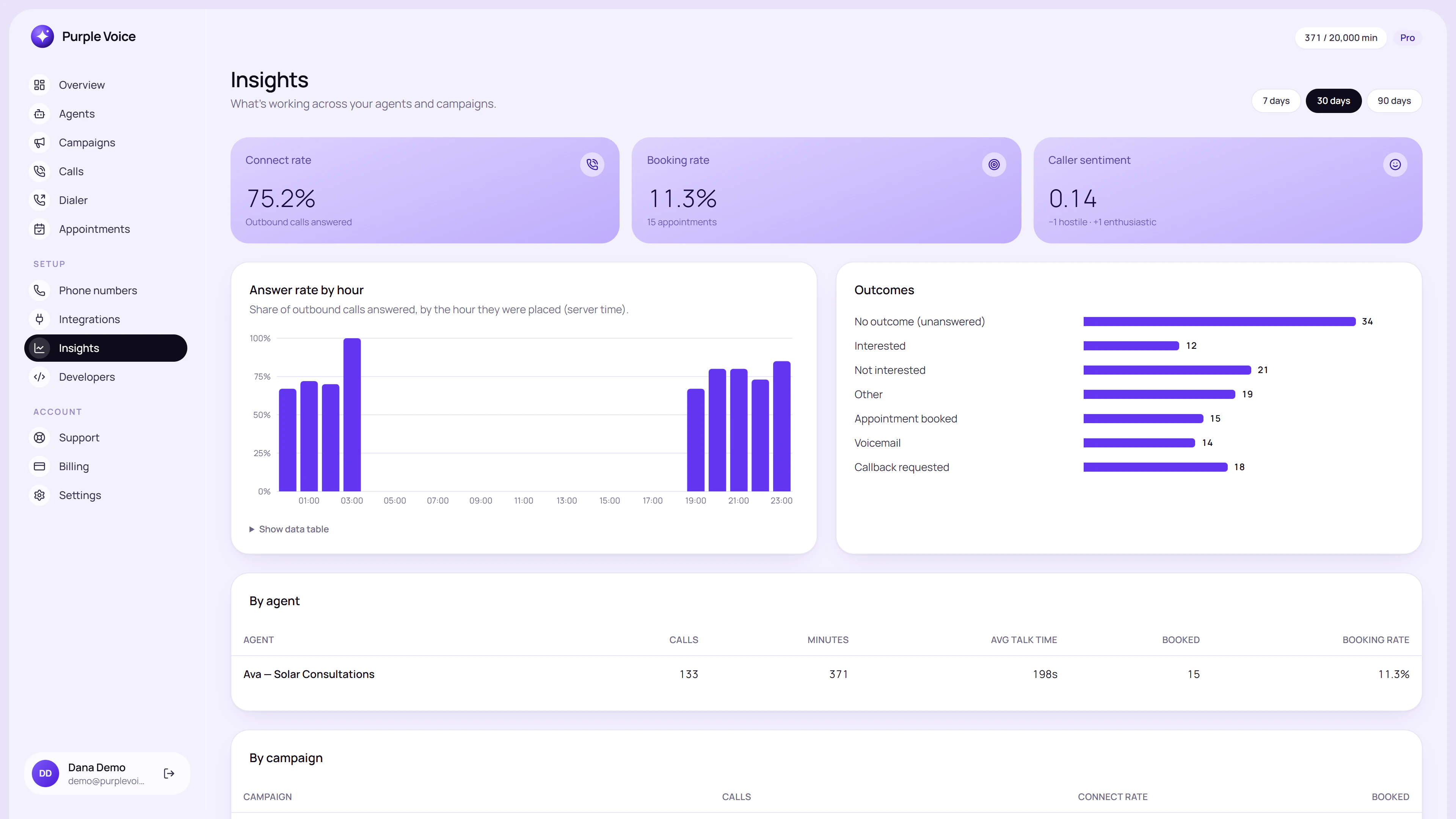 The Insights page, which helps you check contact and booking rates against your assumptions.
Where ROI claims go wrong
- Counting conversations as results. A long call that books nothing has a cost and no return.
- Ignoring show rate. Booked is not attended. AI-booked meetings may no-show more or less than your usual ones, so measure it.
- Applying the best week to the whole month. One strong campaign is not a trend.
- Comparing against a fantasy human. Compare against what your team actually did, not what a perfect SDR would do.
- Forgetting quality. A meeting that is booked with an unqualified lead wastes a salesperson's hour. Include their time.
- Ignoring risk. Compliance problems have costs that dwarf a month's savings. See is AI cold calling legal.
A simple spreadsheet layout
| Row | Formula |
|---|---|
| A. Leads called | Input |
| B. Contact rate | Input |
| C. Conversations | A x B |
| D. Booking rate | Input |
| E. Booked meetings | C x D |
| F. Show rate | Input |
| G. Close rate | Input |
| H. Gross profit per deal | Input |
| I. Monthly cost | Input |
| J. Cost per booked meeting | I / E |
| K. Monthly gross profit | E x F x G x H |
| L. Net return | K - I |
Run it three times: pessimistic, expected and optimistic. Decide using the pessimistic column.
Try it
You can test the maths on real calls without spending anything: the Free plan includes one agent, one number, 100 contacts and 100 minutes a month, with booking and summaries, no card. Start at voice.purplerocket.co, run a small consented campaign, and fill in the spreadsheet with your own rates.
Frequently asked questions
How do you calculate AI voice agent ROI?
Compare the total monthly cost of the agent with the value of the outcomes it produces, such as booked meetings that become customers. A practical metric is cost per booked meeting, then cost per qualified opportunity, compared with what those are worth to you.
What costs should I include?
Platform fees, minutes, phone numbers, AI usage billed by providers, setup time, and the time someone spends reviewing calls. Leaving out the last two is the most common way ROI gets overstated.
How many calls do I need before ROI makes sense?
It depends on the value of a meeting and the cost per call. Work out your break-even booked meetings per month, then check whether your lead volume and booking rate could plausibly deliver that.
Is a higher answer rate always better ROI?
Not necessarily. What matters is booked meetings that happen and convert. Chasing contact rate with poor-quality leads can raise cost without raising revenue.
How long should I run a pilot to measure ROI?
Long enough to see calls turn into meetings and meetings turn into outcomes, which for many sales cycles means several weeks. A 30-day pilot with clear success metrics is a common starting point.
- roi
- pricing
- metrics